If you are a student of Indira Gandhi National Open University (IGNOU) preparing a project or assignment for 2026, one of the most important aspects you must get right is the front page (or cover page) of your submission.
This article provides a comprehensive, up-to-date guide to the ignou project front page, IGNOU front page for project, INGOU front page for assignments, and the correct ignou project front page format.
Table of Contents
What is the IGNOU Project Front Page?
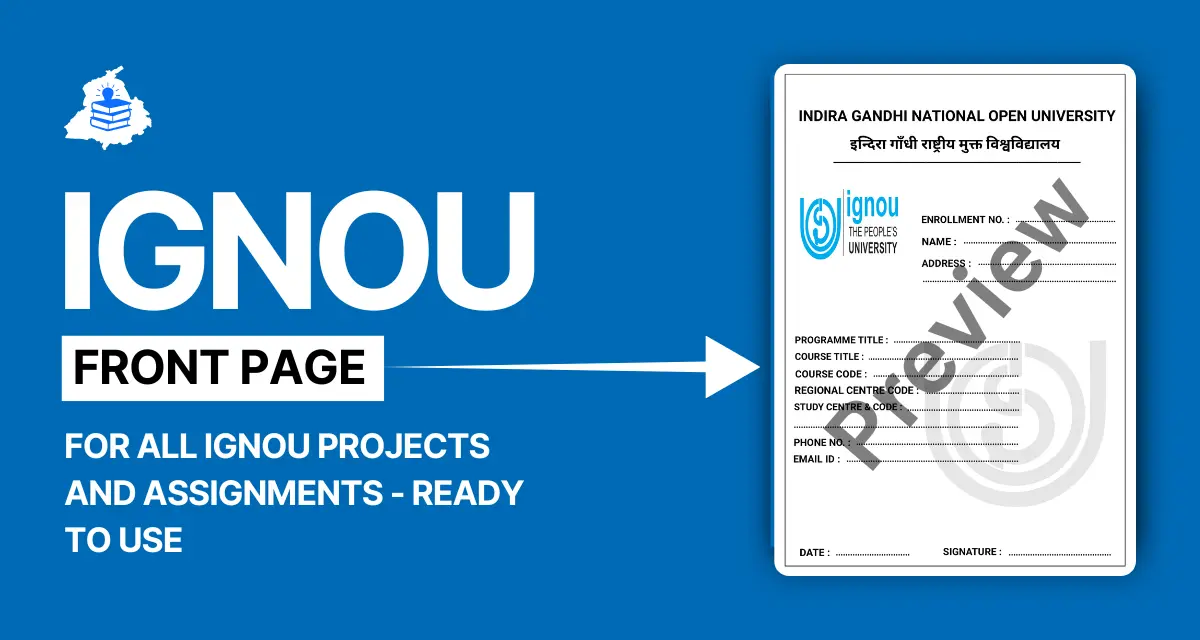
When you submit your project work to IGNOU (whether for an assignment, a project report, dissertation or synopsis), the very first sheet is the “front page” or “cover page”. This sheet carries key information about your submission: your name, enrolment number, programme, course code, title of project or assignment, study centre, date of submission, etc.
For instance, in the official project guidelines the front-page is explicitly mentioned: “Cover Page – must have the Name and Enrolment No. of the Student and the Name of the Guide, along with the Title of the Project.”
Why this is vital: as one site notes, the first page “serves as an identification document for your submission … Correct formatting … minimizes delays in the processing period of your assignment.”
Hence, when you search for “IGNOU Project Front Page PDF”, you are essentially looking for a downloadable template (PDF) that allows you to fill in your details and attach it to your project or assignment so that your submission is compliant, neatly formatted and ready for evaluation.
Why the Front Page Matters
1. Identification & Tracking
When evaluators receive your submission, they need to quickly identify whose work it is, for which programme, course and session. The front page ensures you are correctly identified — Name, Enrolment Number, Programme Code, Course Code, Study Centre, Submission Date. Failing to include correct details can delay your evaluation or even lead to non-acceptance.
2. Compliance with University Guidelines
The university has laid down clear instructions about format, content and sequence of submission. For example: “The first page of the pdf file must carry the correct particulars of the learner as given below: Title of the Project Report / Dissertation / Internship …” (Source: IGNOU project upload instructions).
Adhering to this format shows you have followed guidelines and can avoid rejection or penalty for non-compliance.
3. Professional Presentation
A well-formatted front page gives a positive impression and reflects seriousness. Although academics focus on content, presentation matters — especially when your work is scanned and evaluated digitally.
4. Streamlined Submission Process
Using the correct front page template (often downloadable as PDF) means you fill in details correctly and avoid unnecessary formatting errors (wrong fonts, missing fields etc). There are many free templates available for “IGNOU front page for project” or “IGNOU front page for assignment”. For example, an academic site provides a downloadable “Assignment First Page Format” with all required fields.
Because of these reasons, preparing an accurate ignou project front page and attaching it with the main document is essential for students.
What Does the Format Look Like?
Basic Fields That Must Appear
From multiple official and educational sources, the format typically includes:
- Title of the Project/Assignment/Report
- Name of the Student
- Enrolment Number (as on IGNOU ID card)
- Programme Code and Name (for example, DECE, BCA, MCA, MBA)
- Course Code and Course Title (in case of assignment)
- Study Centre Code/Name or Regional Centre details
- Guide’s Name (for project/dissertation) and their signature/date (for some programmes)
- Session (for example, July 2026 or January 2026)
- Date of Submission
- Student’s Signature (sometimes required)
Format Specifications
- Paper size: usually A4 size, typed or printed (project reports) or handwritten (assignments) depending on guidelines.
- Project reports: double-space typing, hard bound (for offline submission) as per programme guide.
- For assignment front page: clear printing or neat handwriting is acceptable; some centres prefer handwritten front page.
Important Notes
- Each assignment or project may require its own front page. You cannot reuse a front page of another subject.
- Use official template if available to avoid missing fields. Many websites list “front page PDF” templates.
- For online submission (scanned project PDF), the first page of the PDF must be the front page with all correct particulars.
How to Download IGNOU Project Front Page PDF
Step 1: Visit the Official IGNOU Website
Go to the official IGNOU website: ignou.ac.in and check for your programme’s guidelines or student zone > project/assignment section.
Step 2: Download the Template
Look for links like “Front Page Template”, “Cover Page Project Report”, or “Assignment Front Page PDF.” Some regional centres provide a PDF form for each session.
Step 3: Open the PDF (or Word variant)
Open the downloaded file. It contains pre-formatted fields with placeholder text.
Fill in your details: Title, Name, Enrolment No., Programme Code, Course Code, Session, Study Centre, Date of Submission.
Step 4: Attach to Your Work
- For assignments: print the front page and attach it as the very first page of your handwritten assignment or as the first page of your scanned PDF.
- For project reports: include the front page as the very first sheet in the bound volume or as the first page in the scanned PDF submission. Make sure the project guidelines (from your programme) allow that.
Step 5: Review & Submit
Check every field carefully: enrolment number, course codes, study centre code, session etc. Mistakes may delay evaluation or cause rejection. Submit as directed by your study centre or online portal.
For example, for project upload:
“The learners must ensure that the Original Project Report is to be scanned in a single pdf format file … the first page … must carry the correct particulars.”
Special Focus: IGNOU Project Versus Assignment Front Page
For Project Work
When your programme requires a project/report/dissertation (for example, DECE-4 Project Work, MBA Project, MCOM Project), the front page format is slightly more comprehensive. It may include: the word “Project Report”, name of guide/mentor, department/school of study, university name, city (New Delhi) etc.
Example: In one sample:
PROJECT REPORT (MS-100)
INDIRA GANDHI NATIONAL OPEN UNIVERSITY (IGNOU)
School of Management Studies … By Gautam Kumar Mishra … Enrolment No. 091378538 … Under the Supervision of Prof. P.P. Sovani.Therefore, for ignou project front page format, you must pay attention to such details. Your front page must match your programme’s project guide (for example MCOP-001, MMPP-001 etc).
For Assignments
The front page for an assignment has fewer fields (no guide name, no bound volume requirement). It often includes:
student name, enrolment number, programme code, course code, assignment number, study centre code, mobile/email, session, date.
official front page fields:
Name of Student, Enrollment Number, Programme Code, Course Code, Assignment Number, Study Centre Code, Mobile Number, Email Address, Date of Submission.
Hence, understanding whether your submission is assignment or project work is important for selecting the right front page.
Download Free PDF: Where to Get It
- Many websites provide IGNOU front page pdf templates for assignments and project work. For example: “Assignement Front Page PDF 1 · Assignment Front Page PDF 2 · Assignment Front Page PDF 3” on one education resource site.
- For project work: you may find “Ignou Project Front Page – Free download as PDF File” at Punjab Paper Solutions and other document-sharing sites.
- Be careful: ensure the template you download aligns with your session (2026), programme and Regional Centre guidelines.
- Always check the original university or regional centre’s website for the most updated version.
Related Resources
Here are some related solved resources you might find helpful:
- DECE‑4 Project Work PDF Solved 2026 [Hindi] – A sample solved version for DECE-4 project work, in Hindi.
- DECE Assignments Solved 2026 [Hindi] – Solved assignment PDFs for DECE programme in Hindi.
- DECE‑4 Project Work Solved PDF in Hindi 2026 [Sample] – Another sample of solved project work in Hindi.
You can use these resources for reference when you are working on your own project or assignment.
Tips to Avoid Mistakes & Ensure Compliance
- Always use correct enrolment number: It must match your official IGNOU ID card/enrolment letter. Mistyping even one digit can cause mismatch.
- Correct programme code and name: Programmes like DECE, BCA, MCA, MBA each have codes. Using the wrong one may lead to confusion.
- Course code accuracy: For assignments especially ensure you have the correct code (for example MS-100, etc).
- Session details: Provide the correct session (e.g., July 2025) so your work maps to the correct term.
- Use the right template: For assignment vs project. Using assignment front page for project may not satisfy programme requirements.
- Print clearly and attach properly: Avoid blurred prints, handwritten text must be legible. For online submission, scan at recommended resolution.
- Sequencing: Insert front page as the very first sheet of your submission. For project upload, ensure it appears as first page in the single PDF file.
- Check for updates: IGNOU guidelines may change from time to time. Always check your programme guide and regional centre instructions.
- Keep a copy: Retain a scanned copy of your submission (including front page) for your records.
- Use official links: When downloading templates, always refer to the official IGNOU site or the Regional Centre page to avoid outdated or incorrect versions.
Download High-Quality IGNOU Front Page Now
Get your IGNOU Front Page For Project & Assignments 2026 instantly from punjabpapersolutions.in. Our PDFs are ready to use, fully compliant, and optimized for submission. Ensure your projects and assignments stand out with a professional front page.
Download IGNOU Front Page PDFAlso Read: IGNOU DCEC-4 project work pdf free download 2026
FAQs
What happens if I forget to include the front page?
Your assignment or project may be delayed or even rejected since the evaluators won’t have the required identification information. Many guides explicitly warn about missing front page.
Where do I submit once the front page is attached?
Follow your Regional Centre or Study Centre instructions. For offline submissions, submit to the Study Centre. For online/submission portals of IGNOU, upload as per instructions.
Is a handwritten front page acceptable?
Yes, especially for assignments submitted physically, a neatly handwritten front page is generally acceptable.
Do I need to get the front page signed by my guide?
No guide signature is required on the front page.
Can I customise the front page template?
Yes, you may fill in your details (name, enrolment number, title etc). But you must retain required fields as per programme guideline.
Final Words
In the context of your academics at IGNOU for 2026, your ignou project front page is more than just a cover sheet — it is your academic identity for that submission. Whether you are working on an assignment or a full-fledged project report, it is vital to use the correct front page template, fill it accurately, attach/insert it properly, and follow the sequence of submission.
By doing so, you ensure that your evaluators can quickly identify your work, you meet university guidelines, and you avoid avoidable delays or rejections.
Remember to combine this with your main content (well-structured chapters, methodology, data, analysis etc) and submit with confidence.
Downloads: Make sure you get the latest version of the front page PDF for your programme from your Regional Centre or Study Centre website. You can also use the free templates listed above and fill them in.
Related works: If you are working on a project assignment for DECE, BCA or similar programmes, you may also want to download solved resources like “DECE-4 Project Work PDF Solved 2025 [Hindi]”, “DECE Assignments Solved 2025 [Hindi]”, or “DECE-4 Project Work Solved PDF in Hindi 2026 [Sample]” to help you gauge structure and format.